No more whiteboards. No more "what's on the patio TV?" texts. Game Plan lets you build a schedule in minutes, assign games to specific screens, print signs for your staff, and share a live link your guests can check from their phone.
You've got 12 TVs, 8 games, a new bartender who doesn't know where anything goes, and regulars already asking what's showing. Sound about right?
"Which game is on the patio TV?"
Your staff shouldn't have to guess. Game Plan shows every screen assignment in one place - on paper, on a tablet, or on their phone.
The whiteboard was wrong by noon
Kickoff times move. Games get flexed. Channels change. A whiteboard can't keep up. Game Plan updates everywhere at once.
"Are you guys showing the Cowboys game?"
Calls, texts, DMs - all day. Post a QR at the door or share a link on Instagram. Let the schedule answer for you.
The actual product
Here's what you're actually getting
These are real screenshots. Click any image to see it full size.
Pull game schedules in fast
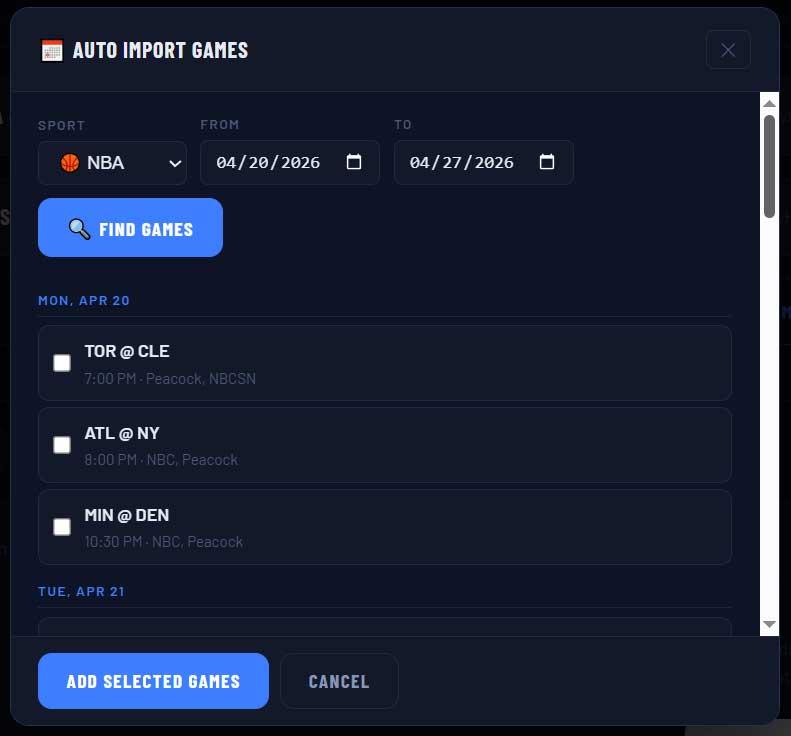
Pick a sport. Pick a date range. Check the games you care about. Click "Add." That's it - no typing team names, no looking up kickoff times. Works for all nine supported sports.
Full-screen display mode
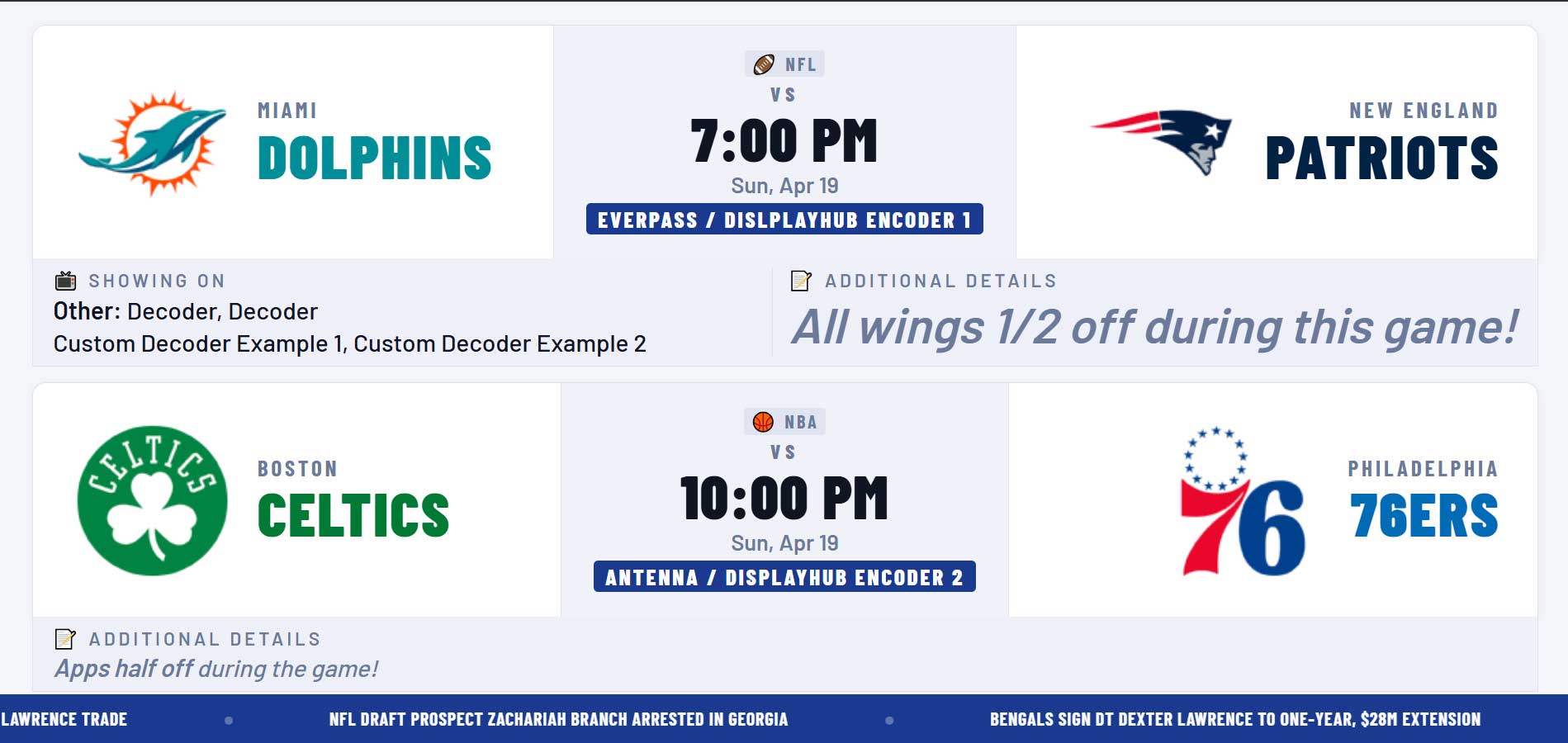
Open the URL on any screen or tablet and this is what you get. A clean live view your guests or staff can check at a glance. Dark or light theme depending on the shared view you choose.
QR codes, links, and embeds
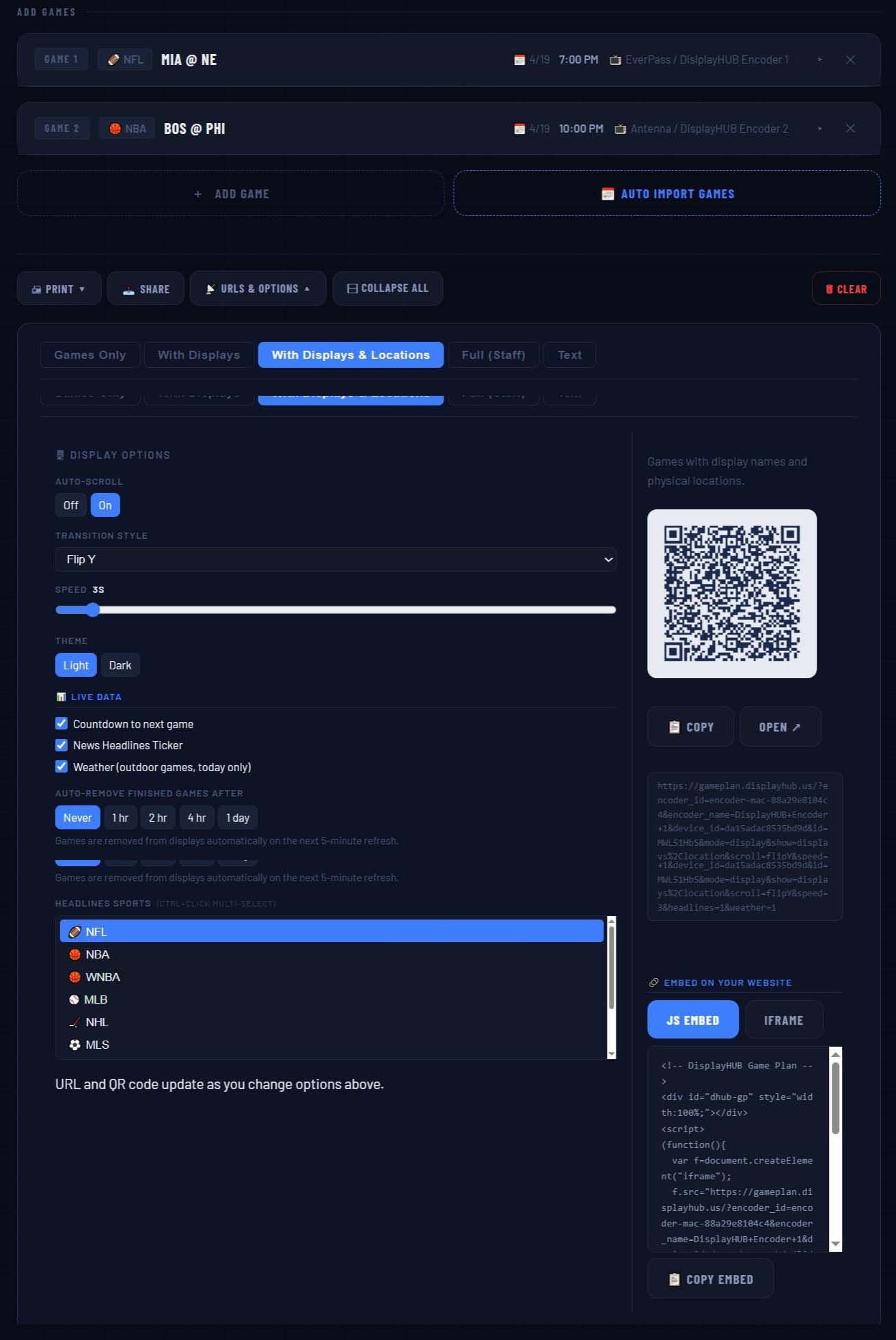
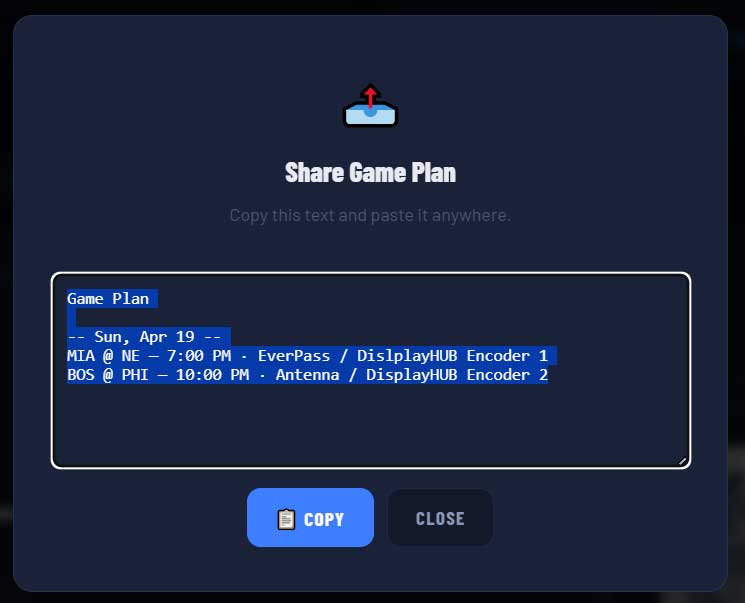
Five different share views - guests-only, with screen assignments, staff-only with notes, and more. Print a QR card. Embed a live widget on your website. Copy a plain-text version for social media.
Flexible planning layouts
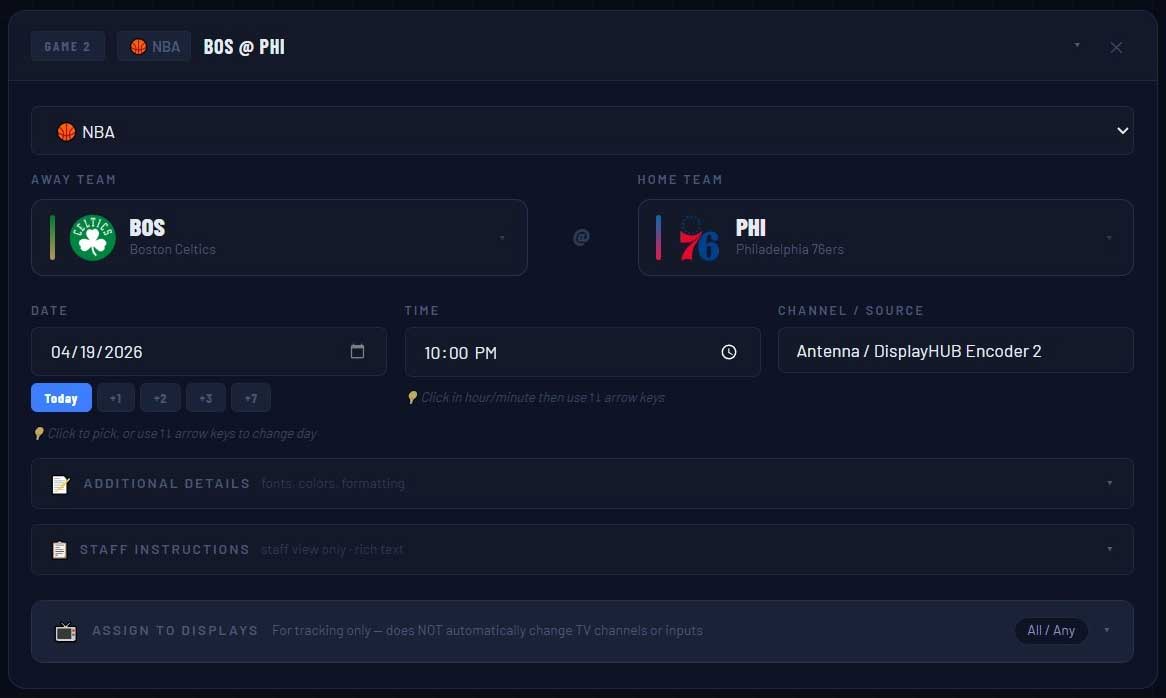
Build your schedule the way your staff thinks. Add games, sort the day, assign screens, and keep everything organized in one place without juggling notes, texts, or whiteboards.
Built for your staff
Give your team a sheet they'll actually use
Half the battle is making sure your bartenders and servers know the plan before the doors open. Game Plan's staff printout puts everything they need on one page.
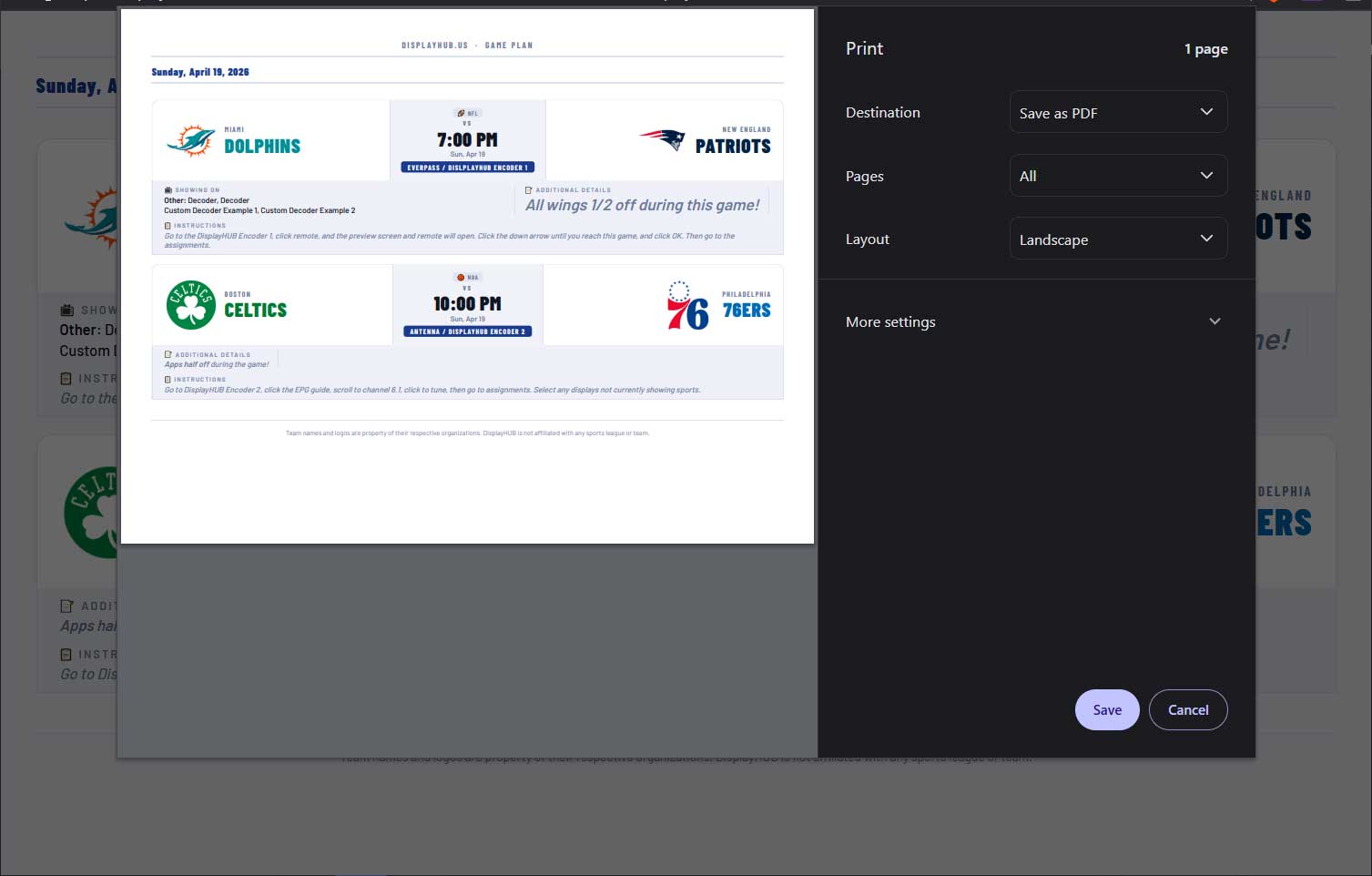
The staff print - your Sunday cheat sheet
Print it, tape it behind the bar, hand a copy to every server. One page with every game, every screen assignment, and every note you added - "happy hour through the first half," "VIP party in Booth 4 at 4pm," "switch patio audio at kickoff."
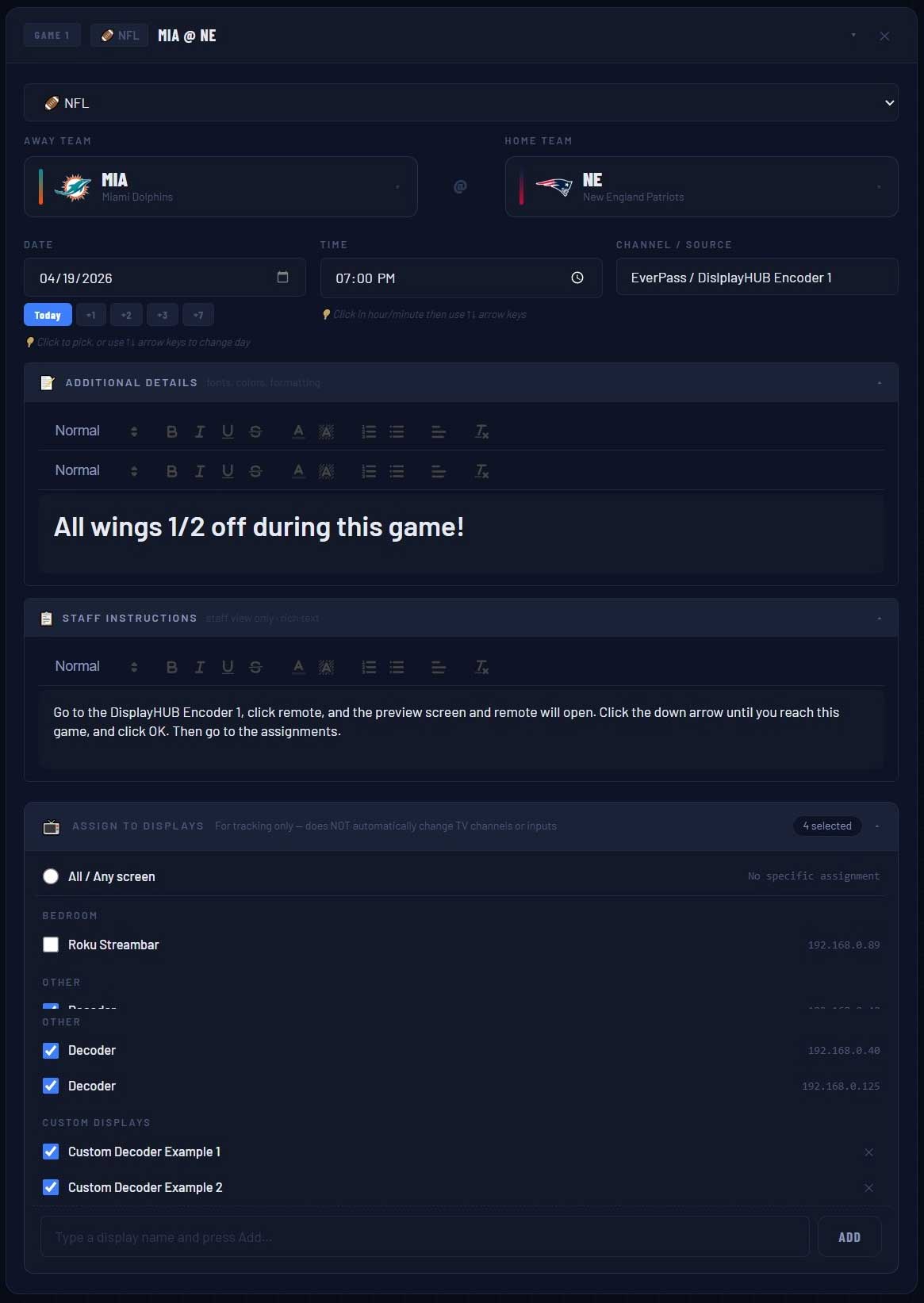
Screen assignments per game - no guessing which TV
Per-game notes - rich text, colors, formatting
Staff-only instructions - guests never see these
One-click print - guest version or staff version
What it does
Everything your staff needs. Nothing they don't.
Assign Games to Specific Screens
For tracking and communication only - Game Plan doesn't change channels automatically. It gives your staff clear, unambiguous instructions so everyone knows which game goes on which TV.
Print Signs in Seconds
Generate a clean, branded printout for the bar top or breakroom. Staff version shows screen assignments and notes. Guest version is clean and simple - just games and times.
Share a Live Link or QR Code
Post the QR at the door, on tables, or next to the TVs. Guests scan and see a live view of today's schedule - no app download, no account needed.
Staff Notes & Instructions
Rich text, per game. Colors, bold, headers - whatever you need. "Switch to patio audio at halftime." "VIP party Booth 4." "Happy hour runs all first half." Only visible on the staff view.
Works with DisplayHUB
If you use the DisplayHUB Sports Bar Control System, your screen list is pulled in automatically. Open Game Plan from your dashboard - displays, names, locations all pre-loaded.
Auto-Import Schedules
Skip the manual entry. Pick a sport, a date range, and check the games you want. NFL, NBA, WNBA, MLB, NHL, MLS, EPL, College Football, College Basketball - all supported in one easy workflow.
Five ways to share your schedule
Games Only
For guests & public screens
With Displays
Shows assigned TVs
With Locations
TVs grouped by area
Full Staff
All details + notes
Text / Embed
For your website
Getting started
Five minutes. That's all it takes.
Open Game Plan
Sign up free or launch it from your DisplayHUB dashboard. Your screens auto-populate if you use DisplayHUB.
Add Your Games
Pick teams and times manually, or use auto-import - select a sport, a date range, check the games you want, done.
Assign Screens
Tap which TVs get which game. Add notes for your staff - "switch audio at kickoff," "VIP party Booth 4."
Share & Print
Print a sign. Share a QR. Post a link. Load it on a tablet under a TV. Change anything later and every link updates instantly.
That said, it is integrated with DisplayHUB. If you already use DisplayHUB, your displays, names, and locations can flow into Game Plan automatically so your planning and your TV control workflow stay aligned.
Always improving
Constantly evolving with real user feedback
Game Plan is not a frozen product. We are constantly evolving it and adding new features based on community input, customer feedback, and the real-world needs of sports bars and staff on busy game days.
Leagues & auto-import
Nine leagues. One planner.
Auto-import pulls games directly into your plan. Pick a sport, a date range, and check the ones you want - teams, times, and channels all filled in automatically. You can also add any game manually if it's not covered.
NFL
NBA
WNBA
MLB
NHL
MLS
EPL
College Football
College Basketball
Plus a "Custom" option for any sport not listed - boxing, UFC, F1, rugby, darts, whatever your bar shows.
Pricing
Just one flat price.
Try it free with 1 game. Upgrade when you're ready - cancel anytime.
On a busy Sunday we'd get 40 calls asking what games we had. Now I post the QR on Instagram the night before and the calls basically stop. The staff version with screen assignments cut our pre-game setup confusion in half.
- Bar manager, sports bar & grill, Florida
Common questions
FAQ
Do I need DisplayHUB hardware to use Game Plan?
Nope. Game Plan works completely standalone. Start free with 1 game, or go unlimited for $10/month or $60/year. If you do use DisplayHUB, your screens auto-populate - saves time, but it's not required.
Do my guests need to download an app?
No. The shared schedule is just a web page. Guests scan a QR or tap a link - opens right in their phone browser. No account, no install, no friction.
Can multiple staff members edit the schedule?
Yes. Anyone with the edit link can make changes. Updates show up immediately on the public link, printed QR codes, and any tablets showing the schedule.
How does auto-import work, exactly?
Click "Auto Import," pick a sport (NFL, NBA, WNBA, MLB, NHL, MLS, EPL, College Football, or College Basketball), choose a date range, and hit "Find Games." You'll see every game in that window with checkboxes. Check the ones you want and click "Add to Plan." Teams, times, and channels are all filled in automatically.
Does Game Plan change channels on my TVs?
No. Game Plan is for planning and communication - it tells your staff which game should be on which TV. It doesn't control the hardware. If you use the full DisplayHUB system, DisplayHUB handles the TV control side while Game Plan handles the planning side.
What about DirecTV and EverPass?
Game Plan works with whatever you're using for content - cable, streaming, antenna, EverPass, Sunday Ticket, whatever. You just tell it what channel or source each game is on, and it shows that info to your staff and guests.
Is my schedule saved if I close the browser?
Yes. Everything saves automatically as you type. No save button. Come back on any device and your schedule is exactly where you left it.
What are the QR codes used for?
Two things: guests and staff. Print a QR card for the front door or table tents so guests can see what's on. Mount a tablet behind the bar with the staff view so your bartenders always know the plan. Same QR, different views depending on which tab you share.
What sports can I add manually?
Anything. The "Other" option lets you type in any two teams - boxing, UFC, F1, rugby, darts, whatever your bar shows. Auto-import covers the nine major leagues; manual covers everything else.
More product views
Screenshots
Browse more real screenshots from Game Plan.
01-editor-2.jpg
auto-import.jpg
DisplayHUB-Game-Plan-Staff.jpg
editor-game-2.jpg
share-button.jpg
urls-qrs-options.jpg
urls-qrs-output-1.jpg
Stop winging it on game day. Start with Game Plan.
Free to try. One game, all features. Upgrade when you're ready - $10/month or $60/year. Included free with DisplayHUB Sports Bar Control System.