
Fixing Raspberry Pi Overheating Issues

How to keep your DisplayHUB encoder running cool and reliable

Why Your Raspberry Pi Is Overheating

The Raspberry Pi inside your DisplayHUB encoder is doing real work: encoding video, pushing streams, and managing overlays. Under heavy load or with poor ventilation, it can reach high temperatures and start to:

  • Throttle CPU speed (slowing down your stream)
  • Show warnings or “too hot” messages in DisplayHUB
  • Randomly stutter, freeze, or reboot

Fortunately, overheating is usually easy to fix with better cooling, placement, and a few small configuration changes.

Common Signs of Overheating

  • CPU temperature above ~80°C
  • Thermal throttling icon or warnings
  • Stream dropping frames under load
  • Encoder UI shows “running too hot” alerts

Fix Placement and Airflow

The fastest, zero-cost improvement is simply where the Pi lives.

Do This

  • Keep the encoder in open air, not inside a closed cabinet
  • Leave space around the case for air to move
  • Keep it away from amplifiers, receivers, or other hot gear
  • Make sure vents on the case are not blocked

Even a small gap around the case can drop temperatures several degrees.

Bad:
  • On top of a hot amp
  • Wedged behind a TV
  • Inside a sealed cabinet

Better:
  • On an open shelf
  • With space around it
  • Away from other heat sources

Add Heatsinks and a Fan

If your Pi is running as an encoder, it should have at least a basic cooling kit: heatsinks on the CPU/RAM and a small 5V fan on the case.

Recommended Cooling Setup

  • Stick-on heatsinks for CPU, RAM, and USB controller
  • Case with built-in fan or fan mount
  • Fan connected to 5V/GND on the Pi GPIO header

With proper cooling, you should see sustained temps well below 80°C, even at high workloads.
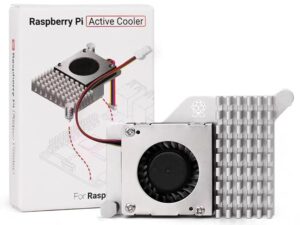
Official Active Cooler for Raspberry Pi 5

~$9

Amazon

Tips & Troubleshooting

💡 Tips

  • Label your encoder and keep it somewhere you can easily access
  • Use zip ties or Velcro to keep cables from blocking vents
  • If you have multiple encoders, keep some space between them
  • Consider a small USB desk fan blowing across several units

🔧 Troubleshooting

  • Still overheating? Double-check the fan is spinning and powered correctly
  • Random reboots? Verify your power supply is a proper 5V/3A (or higher) Pi-rated supply
  • Temps won’t drop? Reduce resolution/bitrate and restart the encoder service
  • Need more help? See the full guide at displayhub.us/encoder-hot.