Sports Bar TV Control System

Route any game to any screen — from your phone.

No remotes. No rewiring. No $10,000 matrix switcher.

DisplayHUB is the only wireless TV control system built for sports bars — running on Roku, Android TV, and Fire TV devices you already own.

Try DisplayHUB Free
See How It Works

What is a sports bar TV control system?

A sports bar TV control system lets you manage every TV in your venue from a single dashboard — routing any source to any screen, switching games instantly, and controlling volume zones without touching a remote. DisplayHUB does all of this wirelessly over your existing network using Roku, Android TV, and Fire TV devices that cost under $30 each.

Sound familiar?

📺

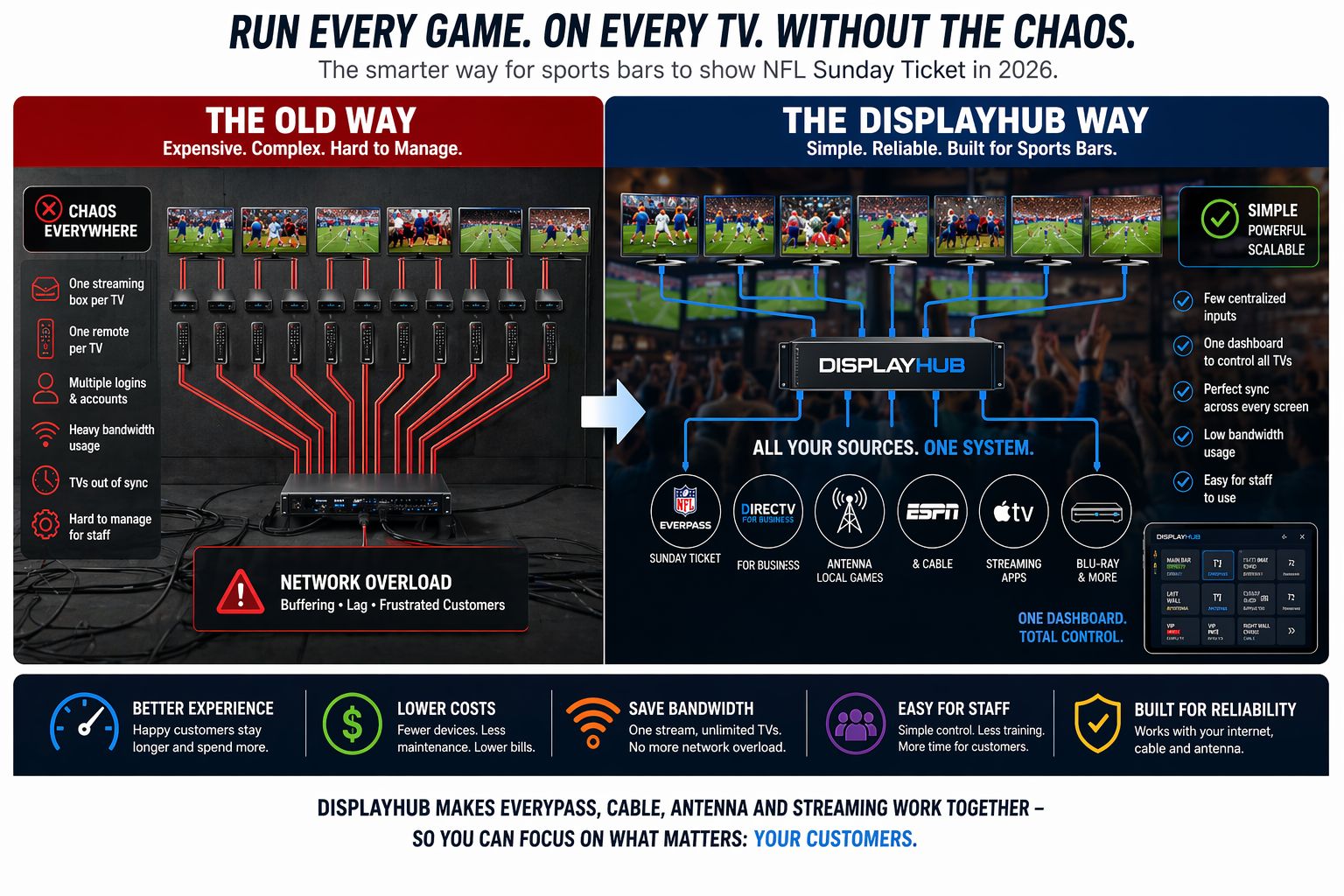
Four remotes, three staff, one chaos

Game night shouldn’t mean your bartender is sprinting between TVs hunting for the right input. It kills the vibe and costs you customers.

💸

You got quoted $8,000 for an HDMI matrix

Traditional hardwired matrix switchers are expensive to buy, expensive to install, and a nightmare to expand. There is a better way.

🔌

Adding a TV means pulling new cable

With wired systems every new screen means new HDMI runs through walls. DisplayHUB works over your existing WiFi — add a screen in minutes, not days.

The wireless sports bar TV control system built for bars, not boardrooms.

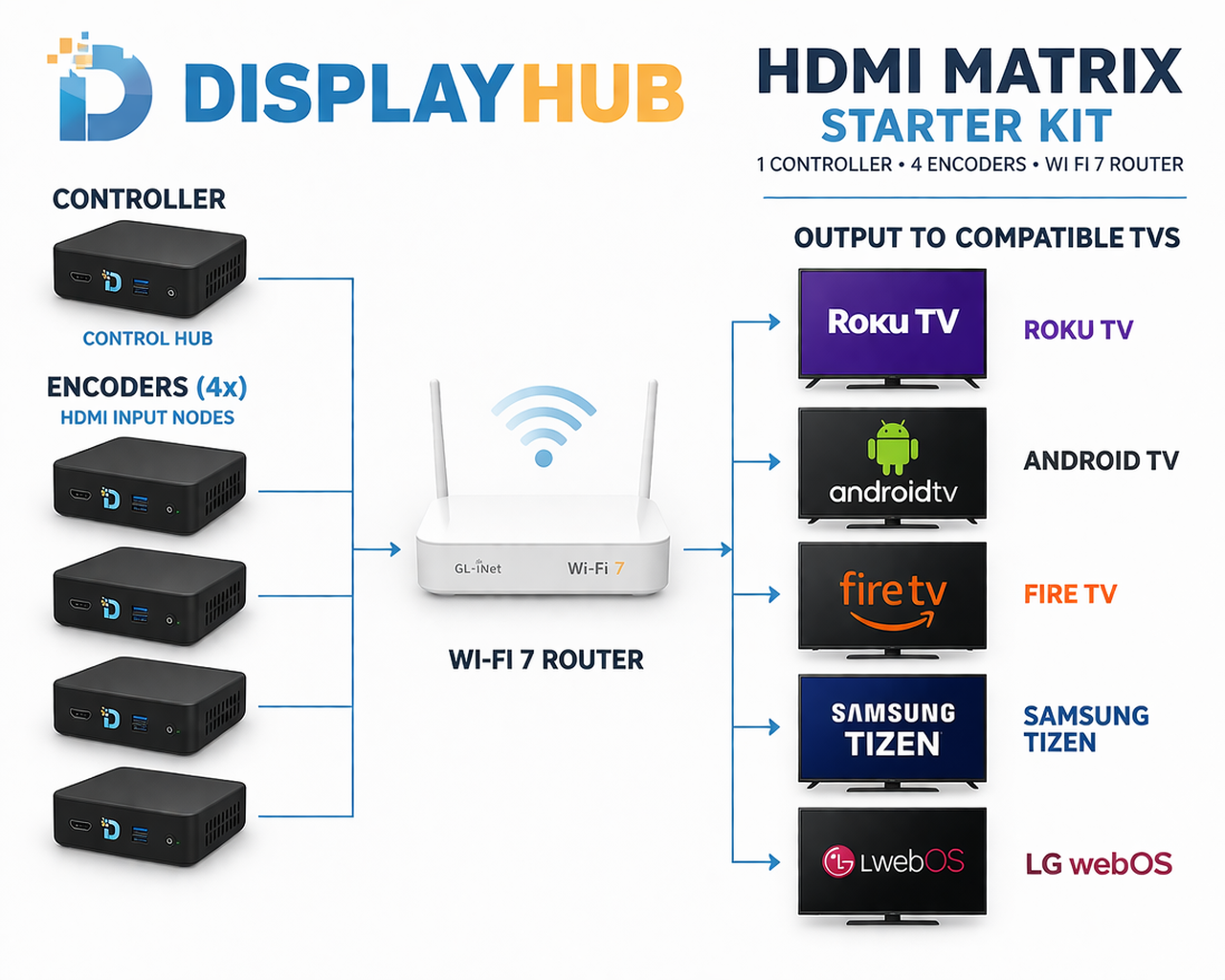
DisplayHUB is the first and only wireless TV matrix that runs directly on smart TVs — Roku, Android TV, Fire TV, Samsung Tizen, and LG WebOS. Instead of a rack-mounted switcher costing thousands, your encoders are Raspberry Pis (under $100 each) and your displays are the TVs you are probably already using.

Control everything from a phone-friendly web dashboard. Route ESPN to the main bar, put NFL Sunday Ticket on the patio, push drink specials as overlays during halftime — all from your pocket.

Free to try. No credit card. No sign-up until you are ready to go live.

Works on the TVs you already have

  • ✓  Roku TVs, sticks & streambars
  • ✓  Android TV & Google TV
  • ✓  Amazon Fire TV
  • ✓  Samsung Tizen 
  • ✓  LG WebOS 
  • ✓  Any HDMI source as input

Off-the-shelf Raspberry Pi hardware. No proprietary boxes. No installer required.

Everything your sports bar needs — nothing you don’t

🎮

Route any source to any TV

Any game, any stream, any HDMI input — sent to any screen or group of screens instantly from your phone.

📡

DirecTV channel control built in

Change DirecTV channels remotely from the same dashboard. No separate app, no walking to the back room.

🍺

Drink specials as on-screen overlays

Push text, images, and promos into the video feed. Halftime beer special? On every screen in two taps.

📶

Backup OTA with HDHomeRun

When satellite goes down on game day, switch to free over-the-air via a $120 HDHomeRun tuner. Be the bar that never loses the signal.

🔄

Synced screens across your venue

Sub-second sync on Android and Fire TV. Tight sync on Roku. Every screen shows the same moment at the same time.

🆓

Free to start — no subscription trap

Run with a small watermark at zero cost. Pay only when you are ready to go fully live. No contracts, no minimum term.

How much does a sports bar TV control system cost?

Traditional HDMI matrix systems cost $5,000–$15,000 before installation. Here is how DisplayHUB compares on a typical 20-screen setup.

  DisplayHUB WolfPack / HDMI Matrix Enterprise AV
Hardware (20 screens) ~$800–$1,500 $5,000–$12,000 $10,000–$25,000+
Installation DIY or optional Requires AV integrator Requires AV integrator
Adding a new screen Plug in a Smart TV / Tablet. Done. New decoder + cable run Call the integrator
Wireless ✓ Yes — first in the world ✗ Wired only ✗ Wired only
Free trial ✓ Forever free with watermark ✗ Purchase required ✗ Purchase required
Typical year-1 total ~$1,500 ~$12,000+ ~$25,000+

Up and running in an afternoon

No AV integrator. No cable runs. No proprietary hardware.

1

Flash your Raspberry Pis

Use our SD card images to set up one controller and one encoder per HDMI source.

2

Install the app on your TVs

Search “DisplayHUB” in the Roku Channel Store, Google Play, or Amazon App Store, Samsung / Tizen apps or KG WebOS apps.

3

Open the dashboard

TVs auto-discover on your local network. Name them, group them, start routing.

4

Go live — free

Run with a watermark at no cost. Remove it with a small per-screen fee when ready.

Read the Full Installation Guide

Frequently asked questions

Do I need to pull HDMI cables to every TV?

No. DisplayHUB distributes video over your existing WiFi or wired network. Your TVs just need the DisplayHUB app installed — available on Roku, Android TV, and Fire TV — and they connect automatically. No new cable runs required.

What hardware do I need to get started?

You need one Raspberry Pi as the controller, one Raspberry Pi per HDMI source (cable box, DirecTV receiver, etc.), and Roku, Android TV, or Fire TV devices on your screens. All hardware is off-the-shelf and easy to return if it does not fit your setup.

Are all TVs in sync when showing the same game?

Yes. Android TV and Fire TV achieve sub-second alignment (around 500ms). Roku TVs stay nearly in sync with tight segment matching. Customers across your whole venue see the same moment at the same time.

What happens if the internet goes down?

DisplayHUB is local-first — everything runs on your internal network. Losing internet does not bring the system down. For satellite or cable outages, a $120 HDHomeRun tuner gives you free over-the-air backup fully controlled from the same dashboard.

Can I control DirecTV channels from the dashboard?

Yes. DisplayHUB has built-in DirecTV receiver control. Change channels on any connected DirecTV box directly from the web dashboard — no separate remote or app needed.

How is DisplayHUB different from a traditional HDMI matrix switcher?

A traditional HDMI matrix requires dedicated decoders at every screen, rack-mounted switchers, and long HDMI or CAT6 runs to every TV. DisplayHUB replaces all of that with Raspberry Pi encoders and your existing smart TVs. Wireless, far cheaper, and expandable without rewiring.

Is there a monthly fee?

No monthly subscription required. The software is free with a small watermark. Remove it with a small per-screen fee — no contract, no minimum term. Full details at displayhub.us/subscription.

Ready to take control of your TVs?

Free to install. Free to test. No credit card required until you go live. Have your bar running DisplayHUB this week.

Get Started Free
Contact Us With Questions